


PassMark WirelessMon for Windows 7 - "Experience Superior Wireless Performance" - Windows 7 Download


PassMark WirelessMon 5.0.1003
Optimize your Wi-Fi with WirelessMon, the ultimate network monitoring tool.
PassMark WirelessMon by PassMark Software is a powerful and versatile wireless network monitoring tool that is designed to help users detect, diagnose, and troubleshoot potential issues with their Wi-Fi networks. With a wide range of features such as signal strength and quality monitoring, network load balancing analysis, and real-time performance alerts, WirelessMon is an essential tool for anyone who relies on a wireless network for work, school, or personal use. With its intuitive interface and powerful tools, PassMark WirelessMon is an excellent choice for network professionals and casual users alike.
PassMark WirelessMon 5.0.1003 full details

| File Size: | 12.50 MB |
|---|---|
| License: | Trialware |
| Price: | $49.00 |
| Released: | 2024-05-21 |
| Downloads: | Total: 2865 | This Month: 130 |
| Publisher: | PassMark Software |
| Publisher URL: | https://www.passmark.com/ |

Download PassMark WirelessMon 5.0.1003
Save PassMark WirelessMon to My Stuff
Tweet
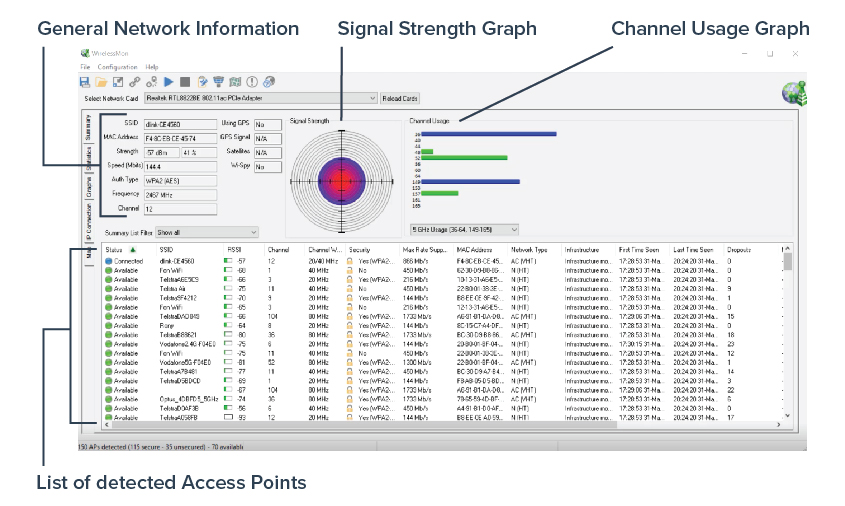
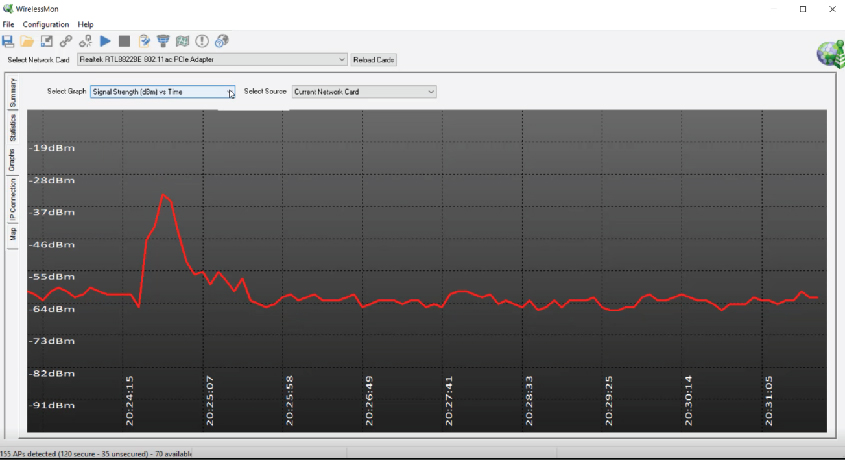
PassMark WirelessMon 5.0.1003 full screenshots
PassMark WirelessMon - Windows 7 Download awards


PassMark WirelessMon 5.0.1003 full description
WirelessMon is a software tool that allows users to monitor the status of wireless WiFi adapter(s) and gather information about nearby wireless access points and hot spots in real time. WirelessMon can log the information it collects into a file, while also providing comprehensive graphing of signal level and real time IP and 802.11 WiFi statistics.
* Verify 802.11 network configuration is correct.
* Test WiFi hardware and device drivers are functioning correctly.
* Check signal levels from your local WiFi network and nearby networks.
* Help locate sources of interference to your network.
* WirelessMon supports the MetaGeek Wi-Spy (2.4i, 2.4x and DBx) useful for finding interference from non 802.11A/B/G devices transmitting on the same frequencies
* Scan for hot spots in your local area (wardriving)
* Create signal strength maps of an area
* GPS support for logging and mapping signal strength
* Correctly locate your wireless antenna (especially important for directional antennas).
* Verify the security settings for local access points.
* Measure network speed & throughput and view available data rates.
* Help check Wifi network coverage and range
Any wireless adapter complies with the NDIS_802.11 should be able to report information to WirelessMon. Note that only Windows XP, 2003 and Vista support this software. Windows 95, 98 and NT are not supported. Windows 2000 (Service pack 4 and above) may work but is not actively supported.
All the various IEEE 802.11 standards are supported, including 802.11a, 802.11b and 802.11g. 802.11N is supported to the extent provided by Windows XP and Vista, as the draft becomes a completed standard more 802.11N support should become available. Some features may not be supported by some wireless adapters, typically they will report only partial information in this case. It has been also been noted that several wireless adapter manufacturers are not providing device drivers that are fully Windows compliant.
The following wireless LAN information is displayed by WirelessMon (when available, as not all wireless adapters will support all of these features).
* Current connection information: SSID; Connected access point MAC address; Signal strength; Tx Power; Authentication type; RTS Threshold; Fragmentation Threshold; Channel in use; Frequency being used; Number of Antennas; Beacon Period; ATIM Window; Dwell Time; Hop Pattern; Hop Set.
* Statistics information: More than 30 parameters are reported. Including a detailed break down of frames sent and received, error counts, transmission retry counters and related low level data.
* IP information: Information about the current TCP/IP connection is reported. Including the adapter MAC address; Adapter device driver name; the IP Address; Subnet Mask; if DHCP is enabled; the Gateway Address and the DHCP server IP address.
* IP counter information: Network throughput is monitored and displayed. This includes the maximum bandwidth available from the network adapter hardware, the current send and receive data rates in bytes per second and packets per second, plus error counters.
* Verify 802.11 network configuration is correct.
* Test WiFi hardware and device drivers are functioning correctly.
* Check signal levels from your local WiFi network and nearby networks.
* Help locate sources of interference to your network.
* WirelessMon supports the MetaGeek Wi-Spy (2.4i, 2.4x and DBx) useful for finding interference from non 802.11A/B/G devices transmitting on the same frequencies
* Scan for hot spots in your local area (wardriving)
* Create signal strength maps of an area
* GPS support for logging and mapping signal strength
* Correctly locate your wireless antenna (especially important for directional antennas).
* Verify the security settings for local access points.
* Measure network speed & throughput and view available data rates.
* Help check Wifi network coverage and range
Any wireless adapter complies with the NDIS_802.11 should be able to report information to WirelessMon. Note that only Windows XP, 2003 and Vista support this software. Windows 95, 98 and NT are not supported. Windows 2000 (Service pack 4 and above) may work but is not actively supported.
All the various IEEE 802.11 standards are supported, including 802.11a, 802.11b and 802.11g. 802.11N is supported to the extent provided by Windows XP and Vista, as the draft becomes a completed standard more 802.11N support should become available. Some features may not be supported by some wireless adapters, typically they will report only partial information in this case. It has been also been noted that several wireless adapter manufacturers are not providing device drivers that are fully Windows compliant.
The following wireless LAN information is displayed by WirelessMon (when available, as not all wireless adapters will support all of these features).
* Current connection information: SSID; Connected access point MAC address; Signal strength; Tx Power; Authentication type; RTS Threshold; Fragmentation Threshold; Channel in use; Frequency being used; Number of Antennas; Beacon Period; ATIM Window; Dwell Time; Hop Pattern; Hop Set.
* Statistics information: More than 30 parameters are reported. Including a detailed break down of frames sent and received, error counts, transmission retry counters and related low level data.
* IP information: Information about the current TCP/IP connection is reported. Including the adapter MAC address; Adapter device driver name; the IP Address; Subnet Mask; if DHCP is enabled; the Gateway Address and the DHCP server IP address.
* IP counter information: Network throughput is monitored and displayed. This includes the maximum bandwidth available from the network adapter hardware, the current send and receive data rates in bytes per second and packets per second, plus error counters.
PassMark WirelessMon 5.0.1003 download tags
Bookmark PassMark WirelessMon
PassMark WirelessMon for Windows 7 - Copyright information
All PassMark WirelessMon reviews, submitted ratings and written comments become the sole property of Windows 7 download. You acknowledge that you, not windows7download, are responsible for the contents of your submission. However, windows7download reserves the right to remove or refuse to post any submission for any reason.
Windows 7 Download periodically updates pricing and software information of PassMark WirelessMon full version from the publisher, but some information may be out-of-date. You should confirm all information.
Using warez version, crack, warez passwords, patches, serial numbers, registration codes, key generator, pirate key, keymaker or keygen for PassMark WirelessMon license key is illegal and prevent future development of PassMark WirelessMon. Download links are directly from our mirrors or publisher's website, PassMark WirelessMon torrent or shared files from free file sharing and free upload services, including Rapidshare, MegaUpload, YouSendIt, SendSpace, DepositFiles, DivShare, HellShare, HotFile, FileServe or MediaFire, are not used.
Windows 7 Download periodically updates pricing and software information of PassMark WirelessMon full version from the publisher, but some information may be out-of-date. You should confirm all information.
Using warez version, crack, warez passwords, patches, serial numbers, registration codes, key generator, pirate key, keymaker or keygen for PassMark WirelessMon license key is illegal and prevent future development of PassMark WirelessMon. Download links are directly from our mirrors or publisher's website, PassMark WirelessMon torrent or shared files from free file sharing and free upload services, including Rapidshare, MegaUpload, YouSendIt, SendSpace, DepositFiles, DivShare, HellShare, HotFile, FileServe or MediaFire, are not used.
Post PassMark WirelessMon review


Windows 7 PassMark WirelessMon related downloads

The Network Activity Indicator application was designed to be a ... in Windows 7 that flashed blue to show network activity on the System Tray. Unlike the original ...
Group Policy Status Monitor provides a way of getting the "heartbeat" of ... using your favorite log collection system. Group Policy Status Monitor runs in the system tray of your XP ...
Network Drive Manager brings added value to users that access network drives in a computer network, ranging from small ...
WIFI Locator ismall utility that runs in the background, and monitor the activity of wireless networks around you. For each detected network it displays ...
Introducing WiFi Manager by CobraTek, the ultimate solution for managing ... users to effortlessly connect, monitor, and optimize their WiFi networks. With its sleek interface, WiFi Manager simplifies ...
My Account
Help
Windows 7 Software Coupons
-
WinX DVD Ripper
50% Off -
Media Player Morpher
85% Off -
WinX MediaTrans
63% Off -
MacX DVD Ripper Pro
50% Off -
FREE VPN PROXY by SEED4.ME WINDOWS
Free VPN by Seed4Me
My Saved Stuff
You have not saved any software.
Click "Save" next to each software.
Click "Save" next to each software.
Would you like to receive announcements of new versions of your software by email or by RSS reader? Register for FREE!
Windows 7 Downloads Picks
- iTop VPN 7.4.0.6857
- RouterOS 7.22.1 Stable
- SABnzbd 4.3.2
- Security Center Lite 4.2
- Network Activity Indicator 1.9
- NetWorx Portable 26.1
- Security Center Pro 4.2
- PuTTY 0.81
- SmartCode VNC Manager Standard Edition 2025.03.1
- TV-Browser 4.2.7
- WebLoad Professional 8.6.0.026
- Hironico Db Tool 2.2.0
- Change MAC Address 25.01
- IPSentry Network Monitoring Suite 7.70.309
- Windows Live Writer 2009 14.0.8089.726
- Microsoft Assessment and Planning Toolkit 5.5.3638.0
- Adobe Flash Player 10 for 64-bit Windows Preview 2
- MyConnection Server 11.4c Build 26040817
- Portable iReasoning MIB Browser Enterprise 14.0 B4717
- Network Drive Manager 2.8.0
Popular Tags
email
html
network
message
google
software inventory
internet
free
computer
address
website
pages
lan
freeware
dns
web
server
ebay
inventory
ping
search
identity management
rss
download
tool
manager
security
auction
software
proxy
Popular Windows 7 Software
- Network Traffic Generator and Monitor 12.6
- Firefox 64bit x64 127.0.2
- iTop VPN 7.4.0.6857
- Google Chrome 126.0.6478.127
- RouterOS 7.22.1 Stable
- Universal Maps Downloader 10.253
- SSuite NetSurfer Browser x64 2.30.16.10
- iTop Private Browser 3.1.0.255
- Allavsoft 3.29.1.9611
- NetSpot for Windows 5.1.0.703
- SSuite NetSurfer Browser 2.30.16.10
- Google Chrome 17 17.0.963.78
- SoftPerfect Network Scanner 26.3
- Google Chrome Portable 126.0.6478.127
- Dukto Portable R6
© 2026 Windows7Download.com - All logos, trademarks, art and other creative works are and remain copyright and property of their respective owners. Microsoft Windows is a registered trademarks of Microsoft Corporation. Microsoft Corporation in no way endorses or is affiliated with windows7download.com.