


NoMachine for Windows 7 - Experience remote desktop like never before. - Windows 7 Download


NoMachine 10.2.3_1
"Experience seamless remote access with NoMachine, the ultimate software solution."
NoMachine is a powerful software that eliminates the need for physical presence. Developed by NoMachine S.à r.l., it offers remote access to your computer from anywhere in the world. With seamless integration, it allows access to all your files and programs from any device. It's fast, reliable and secure. NoMachine is the perfect tool for businesses and individuals looking to work remotely or access their home computers while on the go. Download NoMachine today and enjoy the freedom of remote access.
NoMachine 10.2.3_1 full details

| File Size: | 95.40 MB |
|---|---|
| License: | Trialware |
| Price: | $24.50 |
| Released: | 2026-10-07 |
| Downloads: | Total: 416 | This Month: 6 |
| Publisher: | NoMachine |
| Publisher URL: | https://www.nomachine.com/ |

Download NoMachine 10.2.3_1
Save NoMachine to My Stuff
Tweet

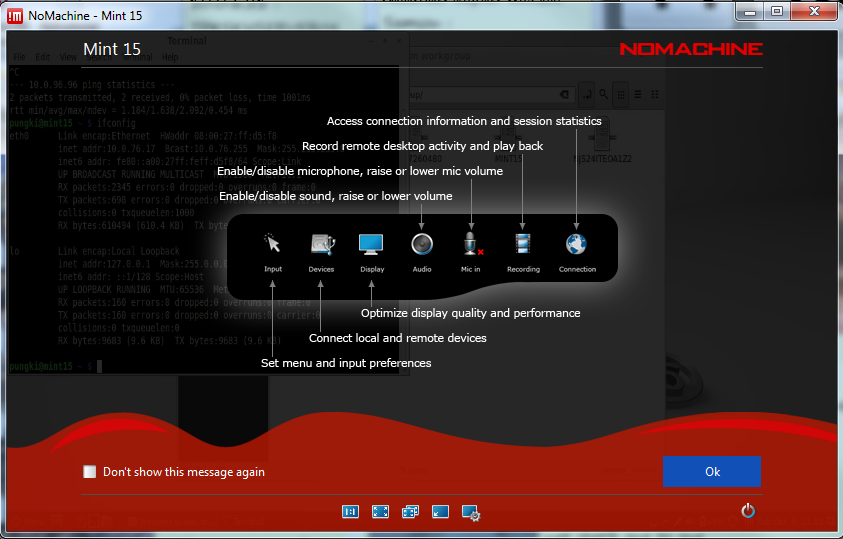
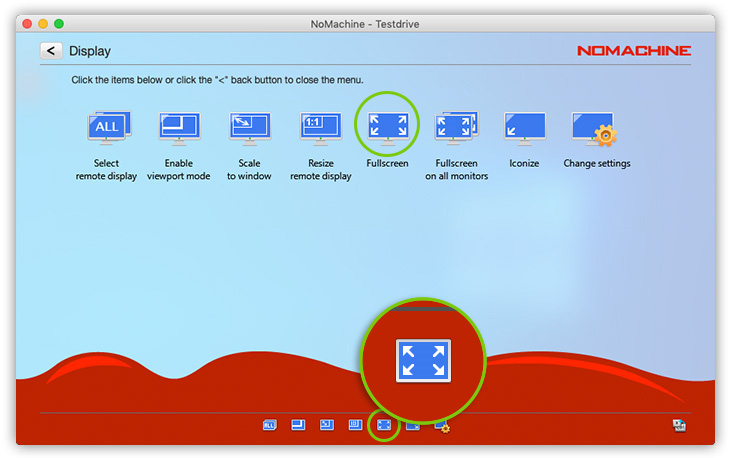
NoMachine 10.2.3_1 full screenshots




NoMachine - Windows 7 Download awards

NoMachine 10.2.3_1 full description
"NoMachine" developed by "NoMachine S.à r.l." is an exceptional software that provides remote access to your computer or server. This cutting-edge technology has transformed the way we access computers, enabling users to access their desktops, applications, and files from anywhere in the world.
The software is lightweight, efficient and powerful. It provides seamless connections with ultra-fast speed. With its intelligent optimization and compression techniques, NoMachine ensures that your remote sessions are always responsive and reliable. You can access multiple devices and platforms with this software, and it supports all popular operating systems.
NoMachine comes equipped with innovative features such as file transfer and printing capabilities that make it easy to collaborate and work remotely. The impressive audio and video quality ensures that your virtual meetings and conferences are seamless and high-quality.
Furthermore, NoMachine has a user-friendly interface that is easy to navigate and customize. The software has an array of advanced security features that keep your data and connections secure from cyber threats and attacks.
In conclusion, NoMachine is an excellent software that brings the world closer through remote access. Whether you’re working from home or on the go, NoMachine enables you to stay connected to your computer and work with ease. So, if you’re looking for a reliable and innovative remote access software, NoMachine is your go-to solution.
The software is lightweight, efficient and powerful. It provides seamless connections with ultra-fast speed. With its intelligent optimization and compression techniques, NoMachine ensures that your remote sessions are always responsive and reliable. You can access multiple devices and platforms with this software, and it supports all popular operating systems.
NoMachine comes equipped with innovative features such as file transfer and printing capabilities that make it easy to collaborate and work remotely. The impressive audio and video quality ensures that your virtual meetings and conferences are seamless and high-quality.
Furthermore, NoMachine has a user-friendly interface that is easy to navigate and customize. The software has an array of advanced security features that keep your data and connections secure from cyber threats and attacks.
In conclusion, NoMachine is an excellent software that brings the world closer through remote access. Whether you’re working from home or on the go, NoMachine enables you to stay connected to your computer and work with ease. So, if you’re looking for a reliable and innovative remote access software, NoMachine is your go-to solution.
NoMachine 10.2.3_1 download tags
NoMachine 10.2.3_1 Windows 7 release notes
New Release
NoMachine makes available version 10.2.3 to provide a number of enhancements designed to simplify deployment and product activation across the NoMachine product portfolio. Key changes include the renaming of NoMachine Enterprise Client to NoMachine Player, the adoption of a unified subscription model for multi-platform server products and an easier activation procedure for online deployments. This update also includes improvements to certificate handling on Windows and updated OpenSSL libraries to further strengthen security and compatibility.
NoMachine Enterprise Client is now NoMachine Player:
NoMachine Player is the new name for our free standalone client. Designed for users who only need to run connections to their remote machines, it provides all the features required for remote access without installing the server component on the local machine. Available for download at https://download.nomachine.com/player/, NoMachine Player can be used to connect to any machine running the Personal Edition or an Enterprise product.
One server subscription for all platforms:
Multi-platform server products now use a single subscription across Windows, macOS, and Linux. Install the package for your preferred OS and activate it with your subscription. If you switch to another supported platform of the same product, the same subscription can be used without requiring a new license.
Easier activation with a subscription key:
For software subscriptions validated online, server software can now be activated through the user interface using a simple ‘subscription key’ eliminating the need to install the complete server.lic file.
Changes to the NoMachine Network trial:
The free 7-day NoMachine Network trial is no longer activated automatically when you create an account. To start a trial of this service, users can login to their User Area on the website and manually activate it from the ‘Evaluations’ section.
Improvements to how CA system certificates are handled:
Additionall
[ NoMachine release history ]
NoMachine makes available version 10.2.3 to provide a number of enhancements designed to simplify deployment and product activation across the NoMachine product portfolio. Key changes include the renaming of NoMachine Enterprise Client to NoMachine Player, the adoption of a unified subscription model for multi-platform server products and an easier activation procedure for online deployments. This update also includes improvements to certificate handling on Windows and updated OpenSSL libraries to further strengthen security and compatibility.
NoMachine Enterprise Client is now NoMachine Player:
NoMachine Player is the new name for our free standalone client. Designed for users who only need to run connections to their remote machines, it provides all the features required for remote access without installing the server component on the local machine. Available for download at https://download.nomachine.com/player/, NoMachine Player can be used to connect to any machine running the Personal Edition or an Enterprise product.
One server subscription for all platforms:
Multi-platform server products now use a single subscription across Windows, macOS, and Linux. Install the package for your preferred OS and activate it with your subscription. If you switch to another supported platform of the same product, the same subscription can be used without requiring a new license.
Easier activation with a subscription key:
For software subscriptions validated online, server software can now be activated through the user interface using a simple ‘subscription key’ eliminating the need to install the complete server.lic file.
Changes to the NoMachine Network trial:
The free 7-day NoMachine Network trial is no longer activated automatically when you create an account. To start a trial of this service, users can login to their User Area on the website and manually activate it from the ‘Evaluations’ section.
Improvements to how CA system certificates are handled:
Additionall
[ NoMachine release history ]
Bookmark NoMachine
NoMachine for Windows 7 - Copyright information
All NoMachine reviews, submitted ratings and written comments become the sole property of Windows 7 download. You acknowledge that you, not windows7download, are responsible for the contents of your submission. However, windows7download reserves the right to remove or refuse to post any submission for any reason.
Windows 7 Download periodically updates pricing and software information of NoMachine full version from the publisher, but some information may be out-of-date. You should confirm all information.
Using warez version, crack, warez passwords, patches, serial numbers, registration codes, key generator, pirate key, keymaker or keygen for NoMachine license key is illegal and prevent future development of NoMachine. Download links are directly from our mirrors or publisher's website, NoMachine torrent or shared files from free file sharing and free upload services, including Rapidshare, MegaUpload, YouSendIt, SendSpace, DepositFiles, DivShare, HellShare, HotFile, FileServe or MediaFire, are not used.
Windows 7 Download periodically updates pricing and software information of NoMachine full version from the publisher, but some information may be out-of-date. You should confirm all information.
Using warez version, crack, warez passwords, patches, serial numbers, registration codes, key generator, pirate key, keymaker or keygen for NoMachine license key is illegal and prevent future development of NoMachine. Download links are directly from our mirrors or publisher's website, NoMachine torrent or shared files from free file sharing and free upload services, including Rapidshare, MegaUpload, YouSendIt, SendSpace, DepositFiles, DivShare, HellShare, HotFile, FileServe or MediaFire, are not used.
Post NoMachine review


Windows 7 NoMachine related downloads
Remote Files Server Edition is special Windows software that ... Innovations Partner Program Some benefits of using Remote Files Server Edition: 1. It saves your ...
Remote Control PRO by Alchemy Lab is a must-have software for anyone who needs quick, secure and efficient access to remote computing. This software ...
Program Connection Meter® originated in September 1998. At the development ... * universality, easy change of prices for connection * independence on setting of computer and operating ...
Splashtop Remote is a useful tool that was designed in ... to offer - from your iPad. With Splashtop® Remote, you can use your iPad to: · ...
DameWare Remote Support (DRS) is an enterprise system management application ... within a "easy to use" centralized interface for remote management of Windows Servers and Workstations. Most ...
My Account
Help
Windows 7 Software Coupons
-
MacX DVD Ripper Pro
50% Off -
MacX Media Management Bundle
70% Off -
WinX MediaTrans
63% Off -
FREE VPN PROXY by SEED4.ME WINDOWS
Free VPN by Seed4Me -
WinX HD Video Converter
56% Off
My Saved Stuff
You have not saved any software.
Click "Save" next to each software.
Click "Save" next to each software.
Would you like to receive announcements of new versions of your software by email or by RSS reader? Register for FREE!
Windows 7 Downloads Picks
- iTop VPN 8.0.0.7373
- RouterOS 7.24.4 Stable
- Fing 3.2
- Network Activity Indicator 1.9
- ProxyChecker 1.4
- LAN Speed Test 4.4
- Nmap 7.992
- Network Drive Manager 2.8.0
- Stunnel 5.82
- TCP Optimizer 4.1.1
- PlanePlotter 6.7.7.5
- NetWorx Portable 26.1
- ScreenHaven 4.8
- EMCO Network Inventory Enterprise 5.8.24.11003
- EMCO Network Inventory Enterprise 5.8.24.11003
- TV-Browser 4.2.7
- Portable Simple Ping 1.0.3
- go.pc 1.23.0
- PuTTY 0.81
- Freegate 7.90
Popular Tags
server
free
address
manager
download
google
email
auction
html
lan
search
website
message
identity management
pages
internet
ping
tool
network
rss
inventory
freeware
security
proxy
software
dns
web
software inventory
ebay
computer
Popular Windows 7 Software
- Network Traffic Generator and Monitor 12.6
- YouTube5 2.6.8
- Firefox 64bit x64 127.0.2
- Pale Moon 35.0.3
- LanFlow 7.58 Build 2228
- AdBlocker Ultimate 5.5.6.0
- Free Download Manager 6.23.0.5754
- VaxVoIP SIP Server SDK 8.6.6.2
- chrlauncher 2.7
- NetProxy 3.2.0
- Free PC Audit 5.4.1
- MetaMask for Firefox 13.55.0
- BlackHawk Web Browser 3.0.205
- Google Chrome 11 11.0.696.71
- MP4 Downloader 6.4.33
© 2026 Windows7Download.com - All logos, trademarks, art and other creative works are and remain copyright and property of their respective owners. Microsoft Windows is a registered trademarks of Microsoft Corporation. Microsoft Corporation in no way endorses or is affiliated with windows7download.com.