


Microsoft Standalone System Sweeper (x64 bit) for Windows 7 - "Protect Your PC with Standalone System Sweeper" - Windows 7 Download


Microsoft Standalone System Sweeper (x64 bit) 1.0.856.0 Beta
"Experience a thorough system cleanup with this standalone sweeper - exclusively for 64-bit Windows 7!"
Introducing Microsoft Standalone System Sweeper, an essential tool for any Windows 7 user. Developed by the trusted team at Microsoft, this x64 bit software is designed to remove malicious and potentially unwanted software from your computer, keeping it running smoothly and efficiently. With easy download and installation, give your device the protection it deserves with Microsoft Standalone System Sweeper.
Microsoft Standalone System Sweeper (x64 bit) 1.0.856.0 Beta full details

| File Size: | 870 kB |
|---|---|
| License: | Freeware |
| Price: | FREE |
| Released: | 2011-05-30 |
| Downloads: | Total: 1631 | This Month: 150 |
| Publisher: | Microsoft |
| Publisher URL: | https://www.microsoft.com |

Download Microsoft Standalone System Sweeper (x64 bit) 1.0.856.0 Beta
Save Microsoft Standalone System Sweeper (x64 bit) to My Stuff
Tweet
Microsoft Standalone System Sweeper (x64 bit) - Windows 7 Download awards

Microsoft Standalone System Sweeper (x64 bit) 1.0.856.0 Beta full description
Microsoft Standalone System Sweeper Beta for Windows x64 is not a replacement for a full antivirus solution providing ongoing protection; it is meant to be used in situations where you cannot start your PC due to a virus or other malware infection. For no-cost, real-time protection that helps guard your home or small business PCs against viruses, spyware, and other malicious software, download Microsoft Security Essentials*.
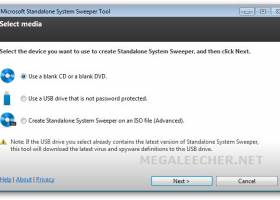
To get started, please make sure that you have a blank CD, DVD, or USB drive with at least 250 MB of space. Next, download and run the tool – the tool will help you to create the bootable media required to run the software on your PC.
* Your PC must run genuine Windows to install Microsoft Security Essentials.
Help & How-To:
I can’t create a bootable CD or DVD
This topic contains solutions for issues you may encounter while trying to create a bootable CD or DVD with the Microsoft Standalone System Sweeper Beta.
Symptoms
An error message is displayed after attempting to create a CD or DVD with the Microsoft Standalone System Sweeper Beta.
I can’t create a bootable USB
This topic contains solutions for issues you may encounter while trying to create Microsoft Standalone System Sweeper Beta on a bootable USB.
Symptoms
An error message is displayed after trying to create a USB drive with Microsoft Standalone System Sweeper Beta.
The files cannot be downloaded by Microsoft Standalone System Sweeper Beta
This topic contains solutions for issues you may encounter while Microsoft Standalone System Sweeper Beta is running and trying to download files.
Symptoms
You receive an error that the download failed.
The CD or DVD is not detected by Microsoft Standalone System Sweeper Beta
This topic contains solutions for issues you may encounter while trying to create a bootable CD or DVD with the Microsoft Standalone System Sweeper Beta.
Symptoms
Before starting the Microsoft Standalone System Sweeper creation process, you insert a blank CD or DVD into the drive. After inserting the disk in the drive, Microsoft Standalone System Sweeper Beta prompts you that no CD or DVD is detected in the drive.
The CD or DVD is not detected by Microsoft Standalone System Sweeper Beta
This topic contains solutions for issues you may encounter while trying to create a bootable CD or DVD with the Microsoft Standalone System Sweeper Beta.
Symptoms
Before starting the Microsoft Standalone System Sweeper creation process, you insert a blank CD or DVD into the drive. After inserting the disk in the drive, Microsoft Standalone System Sweeper Beta prompts you that no CD or DVD is detected in the drive.
How do I restart my computer after using the bootable media?
The bootable media (CD, DVD or USB) starts the computer in the Windows Preinstall Environment (homepage and launches the Microsoft Standalone System Sweeper application for scanning and remediation of virus and malware.
To restart the computer in the live operating system, follow these steps:
1. Close the Microsoft Standalone System Sweeper application by clicking the X button in the top right corner.
2. Click Yes to confirm.
The computer will automatically restart in the live operating system.
To get started, please make sure that you have a blank CD, DVD, or USB drive with at least 250 MB of space. Next, download and run the tool – the tool will help you to create the bootable media required to run the software on your PC.
* Your PC must run genuine Windows to install Microsoft Security Essentials.
Help & How-To:
I can’t create a bootable CD or DVD
This topic contains solutions for issues you may encounter while trying to create a bootable CD or DVD with the Microsoft Standalone System Sweeper Beta.
Symptoms
An error message is displayed after attempting to create a CD or DVD with the Microsoft Standalone System Sweeper Beta.
I can’t create a bootable USB
This topic contains solutions for issues you may encounter while trying to create Microsoft Standalone System Sweeper Beta on a bootable USB.
Symptoms
An error message is displayed after trying to create a USB drive with Microsoft Standalone System Sweeper Beta.
The files cannot be downloaded by Microsoft Standalone System Sweeper Beta
This topic contains solutions for issues you may encounter while Microsoft Standalone System Sweeper Beta is running and trying to download files.
Symptoms
You receive an error that the download failed.
The CD or DVD is not detected by Microsoft Standalone System Sweeper Beta
This topic contains solutions for issues you may encounter while trying to create a bootable CD or DVD with the Microsoft Standalone System Sweeper Beta.
Symptoms
Before starting the Microsoft Standalone System Sweeper creation process, you insert a blank CD or DVD into the drive. After inserting the disk in the drive, Microsoft Standalone System Sweeper Beta prompts you that no CD or DVD is detected in the drive.
The CD or DVD is not detected by Microsoft Standalone System Sweeper Beta
This topic contains solutions for issues you may encounter while trying to create a bootable CD or DVD with the Microsoft Standalone System Sweeper Beta.
Symptoms
Before starting the Microsoft Standalone System Sweeper creation process, you insert a blank CD or DVD into the drive. After inserting the disk in the drive, Microsoft Standalone System Sweeper Beta prompts you that no CD or DVD is detected in the drive.
How do I restart my computer after using the bootable media?
The bootable media (CD, DVD or USB) starts the computer in the Windows Preinstall Environment (homepage and launches the Microsoft Standalone System Sweeper application for scanning and remediation of virus and malware.
To restart the computer in the live operating system, follow these steps:
1. Close the Microsoft Standalone System Sweeper application by clicking the X button in the top right corner.
2. Click Yes to confirm.
The computer will automatically restart in the live operating system.
Microsoft Standalone System Sweeper (x64 bit) 1.0.856.0 Beta download tags
Microsoft Standalone System Sweeper (x64 bit) 1.0.856.0 Beta Windows 7 requirements
Windows XP Service Pack 3; Windows Vista (RTM, Service Pack 1, or Service Pack 2, or higher); Windows 7 (RTM, Service Pack 1, or higher)
Bookmark Microsoft Standalone System Sweeper (x64 bit)
Microsoft Standalone System Sweeper (x64 bit) for Windows 7 - Copyright information
All Microsoft Standalone System Sweeper (x64 bit) reviews, submitted ratings and written comments become the sole property of Windows 7 download. You acknowledge that you, not windows7download, are responsible for the contents of your submission. However, windows7download reserves the right to remove or refuse to post any submission for any reason.
Windows 7 Download periodically updates pricing and software information of Microsoft Standalone System Sweeper (x64 bit) full version from the publisher, but some information may be out-of-date. You should confirm all information.
Using warez version, crack, warez passwords, patches, serial numbers, registration codes, key generator, pirate key, keymaker or keygen for Microsoft Standalone System Sweeper (x64 bit) license key is illegal and prevent future development of Microsoft Standalone System Sweeper (x64 bit). Download links are directly from our mirrors or publisher's website, Microsoft Standalone System Sweeper (x64 bit) torrent or shared files from free file sharing and free upload services, including Rapidshare, MegaUpload, YouSendIt, SendSpace, DepositFiles, DivShare, HellShare, HotFile, FileServe or MediaFire, are not used.
Windows 7 Download periodically updates pricing and software information of Microsoft Standalone System Sweeper (x64 bit) full version from the publisher, but some information may be out-of-date. You should confirm all information.
Using warez version, crack, warez passwords, patches, serial numbers, registration codes, key generator, pirate key, keymaker or keygen for Microsoft Standalone System Sweeper (x64 bit) license key is illegal and prevent future development of Microsoft Standalone System Sweeper (x64 bit). Download links are directly from our mirrors or publisher's website, Microsoft Standalone System Sweeper (x64 bit) torrent or shared files from free file sharing and free upload services, including Rapidshare, MegaUpload, YouSendIt, SendSpace, DepositFiles, DivShare, HellShare, HotFile, FileServe or MediaFire, are not used.
Post Microsoft Standalone System Sweeper (x64 bit) review


Windows 7 Microsoft Standalone System Sweeper (x64 bit) related downloads
Trend Micro Internet Security Pro is for Windows x64 provides the most comprehensive, easy-to-use protection for your ...
Microsoft Standalone System Sweeper Beta is not a replacement for a full antivirus solution providing ongoing protection; it is meant to be used in situations ...
The Microsoft Safety Scanner x64 is a free downloadable security tool that provides on-demand scanning and helps remove ...
December 2013 Security and Critical Releases ISO Image does not contain security updates for any other Microsoft products. This ...
This DVD5 ISO image file contains the security updates for Windows released on Windows Update on ...
My Account
Help
Windows 7 Software Coupons
-
FREE VPN PROXY by SEED4.ME WINDOWS
Free VPN by Seed4Me -
WinX DVD Copy Pro
42% Off -
WinX MediaTrans
63% Off -
MacX MediaTrans
63% Off -
MacX DVD Ripper Pro
50% Off
My Saved Stuff
You have not saved any software.
Click "Save" next to each software.
Click "Save" next to each software.
Would you like to receive announcements of new versions of your software by email or by RSS reader? Register for FREE!
Windows 7 Downloads Picks
- Microsoft Safety Scanner 1.449.489.0 (May 7,
- BitDefender Free Edition 27.0.35.146
- Kaspersky Virus Removal Tool 20.0.14.0 (07.05.202
- Malwarebytes Anti-Malware 5.5.2.242
- Windows Malicious Software Removal Tool - 64 bit 5.139.26020.1001
- Avast Free Antivirus 26.4.10932
- AVG AntiVirus Free 26.4.10932
- COMODO Cloud Scanner 2.0.162151.21
- Microsoft Safety Scanner x64 1.413.543.0
- RegRun Reanimator 18.20.2026.429
- Prevx CSI - Free Malware Scanner (32 bit) 3.0.5.3
- Symantec Endpoint Protection 14.3.3384.1000
- avast! Pro Antivirus 20.5.5410
- Windows Malicious Software Removal Tool - 32 bit 5.125
- Trend Micro Virus Pattern File 19.429.00
- Kaspersky Rescue Disk 18.0.11.3d (2026.05.
- avast! 5 Home Edition 6.0.1000
- AVG Free Edition 2015 2015.6140
- Security Release ISO Image February 2010 KB913086
- avast! 5 Pro Antivirus 6.0.1000
Popular Tags
antispam
worms
protection
rootkit
virus scan
antivirus software
scanner
anti virus
virus scanner
free antivirus
internet security
antispyware
worm
remove
adware
free
firewall
software
virus protection
scan
malware
security
anti-virus
anti spyware
antivirus
trojans
trojan
spyware
virus
computer security
Popular Windows 7 Software
- VPNBook
- IObit Malware Fighter 13.2.0.1635
- Microsoft Safety Scanner 1.449.489.0 (May 7,
- Malwarebytes Chameleon 3.1.33.0
- Free Folder Lock 2.3.8.8
- DualSafe Password Manager 1.4.0.14
- Deep Freeze 8.71.20.5734
- 7thShare Folder Lock Pro 2.3.8.8
- EventSentry Light 6.0.1.48
- Top Data Protector 3.1.0.18
- Sandboxie 1.17.5 Plus
- imyPass iPassBye 1.0.16
- Advanced SystemCare Ultimate 18.2.0.91
- imyPass iPassGo 1.0.52
- Alternate Password DB 3.710
© 2026 Windows7Download.com - All logos, trademarks, art and other creative works are and remain copyright and property of their respective owners. Microsoft Windows is a registered trademarks of Microsoft Corporation. Microsoft Corporation in no way endorses or is affiliated with windows7download.com.