


Maxthon for Windows 7 - Tabbed browsing with cloud sync and reading tools - Windows 7 Download


Maxthon 7.5.3.3000
A customizable tabbed browser with reading tools and cross-device cloud services.
Windows7Download.com review:
As Windows 7 gains more users, a lot of them certainly would want to have their old software working on the new operating system. Backwards compatibility has always been one of Microsoft's stronger points and as long as software sticks to basic Microsoft guidelines for software development, most of these programs will work on newer Windows versions. Users in the United States and in Europe might not have even heard of Maxthon, but in China, this alternative home-grown web browser is highly popular. The latest reports show that Maxthon has already been downloaded more than 200 million times.
Maxthon first existed as the MyIE web browser which utilizes the same web browsing engine of Internet Explorer. Its original developer, Changyou, wanted to customize Internet Explorer but ended up creating completely new software instead. Jeff Chen took over development when Changyou left in 2000. It was Jeff Chen who made MyIE2 and it was in his watch where the browser exploded in popularity in China. In 2004, after receiving funding from Western sources such as Skype investor Morten Lund, it was renamed as Maxthon. Today, under CEO Jeff Chen, its latest version is 2.5.9.
Maxthon will be able to take advantage of added browser specific functionality and enhanced browsing experience under Windows 7 once the Maxthon Windows 7 optimized version finishes development. The present 2.5.9 version is already richly functional and includes features such as a tabbed interface, ad blocking, support for mouse gestures, page grouping, URL aliasing, and many others. Such rich functionality works when Maxthon 2.5.9 is run on Windows 7. Jeff Chen is particularly thrilled about Windows 7 and browser technology citing the exciting future of browsers as the interface between the user and cloud computing.
Technically sophisticated users will like the extensibility of Maxthon via plugins. For web developers, the firebug plugin, once an exclusive feature of Firefox, can be used on Maxthon to go over HTML markup, page structure, and CSS tags of most modern web pages. Other plugins are specific to Chinese users who would want to do something on the web without the need to understand the English language.
If you ever close a tab by mistake, use the undo button, a feature Internet Explorer or Firefox badly needs. The Trusted Website Check is a visual indicator that you are surfing in safe territory when the address bar turns green. This is a necessary tool for users doing transactions that might require transmission of confidential data. There is a one click button to erase all private data from the computer where you did web browsing. If you are sharing a computer with others, such as an Internet Cafe, the Clean Private Data feature is one thing you should use.
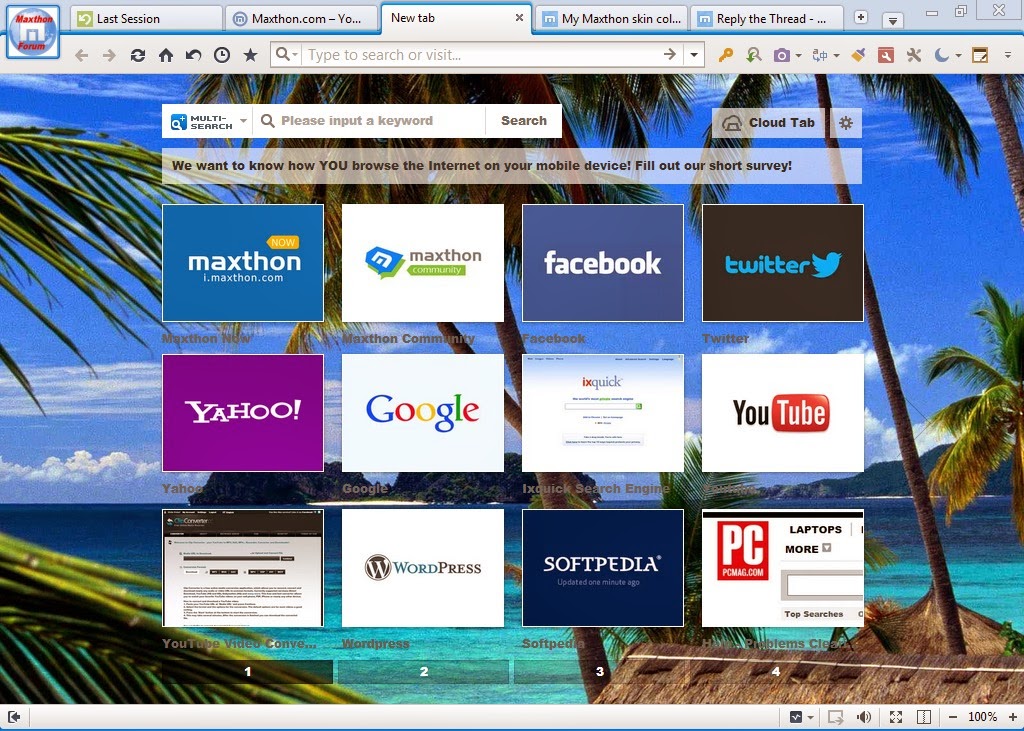
Go over a list of your favourite web sites not as a boring listing of URLs but as a grid of configurable thumbnails for both your favourite and recently visited sites. If a tab freezes over because of buggy script or timeout issues, Maxthon's Isolator feature prevents the entire Maxthon browser from freezing, instead only the current unresponsive page is affected.
These Maxthon features are all designed to be straightforward, easy to manipulate, speedy and most of all compactly designed. Small is indeed beautiful in a world where netbooks are starting to become the number one selling category of computers. Netbook users worrying about heavy applications might consider using earlier versions of Maxthon such as version 1.6. It has a small disk and memory footprint but it is fully compatible with Windows XP up to Windows 7.
Maxthon is currently a partner to several software/web companies like Microsoft where they exhibited products side by side during the Consumer Electronics Show, with Charles River Ventures, and also with Russia's largest search engine Yandex, where Maxthon agreed to develop a Russian version of the browser, and Yandex will be the default front page for the browser.
Maxthon is a Windows 7 compatible application and because of its conformity to Microsoft programming guidelines, users wanting to migrate to the newest Microsoft operating system need not worry about their favourite browser not working. This free software has been a recipient of many awards including CNET's Webware 100 award for the browser category, Read Write Web's Top 10 International Products for 2008, among many others.
Author's description:
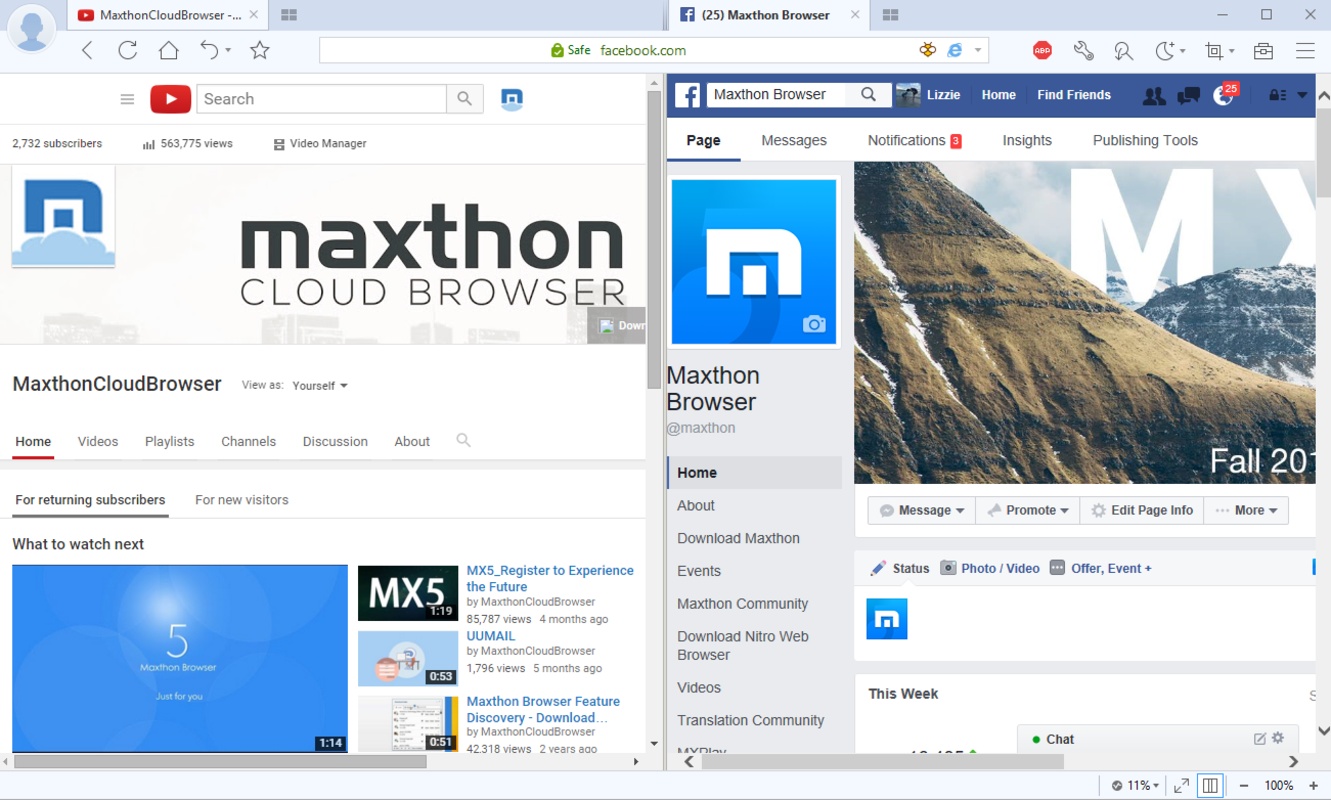
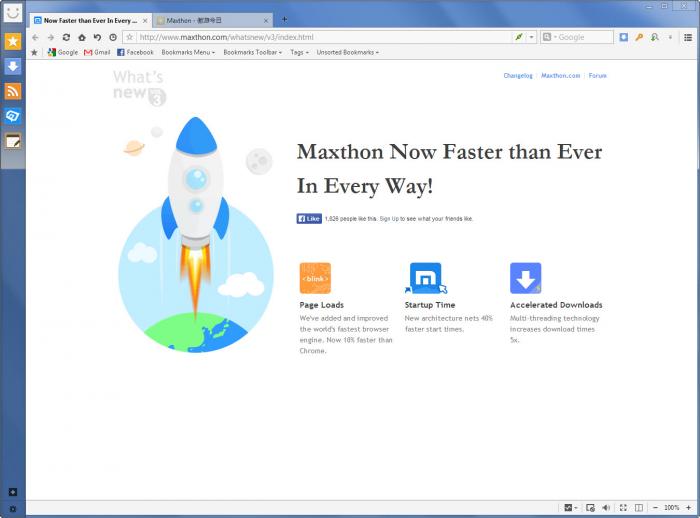
Maxthon is a tabbed web browser with a dual-core engine combining WebKit and Trident for website rendering. It includes tab recovery, mouse gestures, an eight-engine search toolbar, private windows, Reader Mode, Night Mode and ad blocking. Cloud services can sync favorites, settings and tabs, and transfer links, files and other content between devices. Its interface supports skins, plugins and filter packs.Maxthon 7.5.3.3000 full details

| File Size: | 135.00 MB |
|---|---|
| License: | Adware |
| Price: | FREE |
| Released: |
2026-10-20
 |
| Downloads: | Total: 14292 | This Month: 236 |
| Publisher: | Mysoft Technology |
| Publisher URL: | http://www.maxthon.com |

Download Maxthon 7.5.3.3000
Save Maxthon to My Stuff
Tweet

Maxthon 7.5.3.3000 full screenshots
Maxthon - Windows 7 Download awards



Maxthon 7.5.3.3000 full description
Maxthon is a tabbed web browser for people who want flexible page display, built-in browsing tools and ways to carry tabs or files between devices. Its dual-core engine combines WebKit and Trident to render websites, with the browser choosing an engine to support page compatibility. A customizable interface lets users adapt the browser with skins, plugins and filter packs.
Tabs keep multiple pages organized in one window, and an undo control restores tabs closed by mistake. Mouse gestures provide quick access to common actions such as going back, moving forward, refreshing a page or closing a tab. Super Drag & Drop turns selected text into a search: users can drag a keyword to start a lookup, or enter it in the address bar. A toolbar offers searches through eight engines, while private-window and new-session options support separate browsing contexts.
For reading, Reader Mode removes advertisements and other page distractions and allows font-size adjustments. Night Mode reduces screen brightness for use in dim surroundings. Ad Hunter blocks pop-up windows and removes ad content blocks. The Favorites service stores bookmarks for access across devices; its encrypted standalone file format can also help protect saved favorites when a computer is shared. A built-in notepad handles quick notes and scripts, and External Tools can launch programs such as Paint or Calculator from the browser.
Maxthon Cloud Services connect the browser with other devices and contacts. Cloud Push sends text, images, links and tabs to supported Mac, Android and Windows systems, while My Cloud Tabs synchronizes open tabs with Android, iOS and Mac devices. Cloud Sync carries favorites, settings and Magic Fill data between devices. Cloud Share lets users share text, images, links and files, and Cloud Download can upload downloaded files to My Cloud for backup and access elsewhere.
The browser is freeware and is available for Windows, including Windows 7, Windows 8, Windows 10 and Windows 11. Its cloud features are useful for people who move between desktop and mobile devices, while gestures, reading modes and page controls suit everyday browsing. Syncing and cross-device services require an account and compatible devices; users who prefer local browsing can also use its tabs, search, notepad and customization tools.
Tabs keep multiple pages organized in one window, and an undo control restores tabs closed by mistake. Mouse gestures provide quick access to common actions such as going back, moving forward, refreshing a page or closing a tab. Super Drag & Drop turns selected text into a search: users can drag a keyword to start a lookup, or enter it in the address bar. A toolbar offers searches through eight engines, while private-window and new-session options support separate browsing contexts.
For reading, Reader Mode removes advertisements and other page distractions and allows font-size adjustments. Night Mode reduces screen brightness for use in dim surroundings. Ad Hunter blocks pop-up windows and removes ad content blocks. The Favorites service stores bookmarks for access across devices; its encrypted standalone file format can also help protect saved favorites when a computer is shared. A built-in notepad handles quick notes and scripts, and External Tools can launch programs such as Paint or Calculator from the browser.
Maxthon Cloud Services connect the browser with other devices and contacts. Cloud Push sends text, images, links and tabs to supported Mac, Android and Windows systems, while My Cloud Tabs synchronizes open tabs with Android, iOS and Mac devices. Cloud Sync carries favorites, settings and Magic Fill data between devices. Cloud Share lets users share text, images, links and files, and Cloud Download can upload downloaded files to My Cloud for backup and access elsewhere.
The browser is freeware and is available for Windows, including Windows 7, Windows 8, Windows 10 and Windows 11. Its cloud features are useful for people who move between desktop and mobile devices, while gestures, reading modes and page controls suit everyday browsing. Syncing and cross-device services require an account and compatible devices; users who prefer local browsing can also use its tabs, search, notepad and customization tools.
Maxthon 7.5.3.3000 download tags
Maxthon 7.5.3.3000 Windows 7 release notes
New Release
Fixed an issue in the Maxnote editor where pressing Enter failed to create a new numbered item.
Fixed an issue where disabled built-in extensions would turn themselves back on.
Fixed abnormal display of extensions in the toolbar.
Fixed a display issue with the video toolbar in the video list.
Fixed an issue where some paid orders could not return to the download after payment completed during video downloads.
Fixed known crashes.
[ Maxthon release history ]
Fixed an issue in the Maxnote editor where pressing Enter failed to create a new numbered item.
Fixed an issue where disabled built-in extensions would turn themselves back on.
Fixed abnormal display of extensions in the toolbar.
Fixed a display issue with the video toolbar in the video list.
Fixed an issue where some paid orders could not return to the download after payment completed during video downloads.
Fixed known crashes.
[ Maxthon release history ]
Bookmark Maxthon
Maxthon for Windows 7 - Copyright information
All Maxthon reviews, submitted ratings and written comments become the sole property of Windows 7 download. You acknowledge that you, not windows7download, are responsible for the contents of your submission. However, windows7download reserves the right to remove or refuse to post any submission for any reason.
Windows 7 Download periodically updates pricing and software information of Maxthon full version from the publisher, but some information may be out-of-date. You should confirm all information.
Using warez version, crack, warez passwords, patches, serial numbers, registration codes, key generator, pirate key, keymaker or keygen for Maxthon license key is illegal and prevent future development of Maxthon. Download links are directly from our mirrors or publisher's website, Maxthon torrent or shared files from free file sharing and free upload services, including Rapidshare, MegaUpload, YouSendIt, SendSpace, DepositFiles, DivShare, HellShare, HotFile, FileServe or MediaFire, are not used.
Windows 7 Download periodically updates pricing and software information of Maxthon full version from the publisher, but some information may be out-of-date. You should confirm all information.
Using warez version, crack, warez passwords, patches, serial numbers, registration codes, key generator, pirate key, keymaker or keygen for Maxthon license key is illegal and prevent future development of Maxthon. Download links are directly from our mirrors or publisher's website, Maxthon torrent or shared files from free file sharing and free upload services, including Rapidshare, MegaUpload, YouSendIt, SendSpace, DepositFiles, DivShare, HellShare, HotFile, FileServe or MediaFire, are not used.
Maxthon users' reviews
Maxthon 4.1.2.3000
review by jagdeep (Feb 23, 2016)


its a good software
Maxthon 4.1.2.3000
review by abbas (Aug 3, 2014)
i wanted maxthon 4.1.2.3000 because agood browser
Maxthon 4.1.0.2000
review by john l olson (Jul 14, 2013)
we have been told that this is a good browser
Maxthon 3.4.5.2000
review by roldanmanikis (Nov 18, 2012)
i find it very fast and very useful browser
Post Maxthon review


Windows 7 Maxthon related downloads
Maxthon Browser provides a rich feature set to improve ... 100 million other smart Web users have. Maxthon Works the Way You Want It To Swap, ...
... the top picks on our site is Portable Maxthon, developed by Mysoft Technology.
Portable Maxthon is a versatile ...
My Account
Help
Windows 7 Software Coupons
-
WinX DVD Copy Pro
42% Off -
WinX DVD Ripper
50% Off -
MacX DVD Ripper Pro
50% Off -
MacX Media Management Bundle
70% Off -
WinX MediaTrans
63% Off
My Saved Stuff
You have not saved any software.
Click "Save" next to each software.
Click "Save" next to each software.
Would you like to receive announcements of new versions of your software by email or by RSS reader? Register for FREE!
Windows 7 Downloads Picks
- Firefox 64bit x64 127.0.2
- Google Chrome 126.0.6478.127
- iTop Private Browser 3.1.0.255
- Google Chrome 17 17.0.963.78
- Google Chrome Portable 126.0.6478.127
- Firefox 9 9.0.1
- Google Chrome 11 11.0.696.71
- X-Browser 1.4
- Firefox 18 18.0.2
- Google Chrome 6 6.0.495.0
- Google Chrome 10 10.0.648.204
- Google Chrome 18 18.0.1025.168
- Pale Moon Portable x64 33.1.0
- Firefox 128.4.0
- Google Chrome 2 2.0.172.43
- iTunes 12.13.10.3
- Internet Explorer 10 10.0.9200.16521
- Pale Moon 35.0.2
- Google Chrome 16 16.0.912.77
- Firefox 22 22.0
Popular Tags
offline
web browser
list
firefox
download
top
internet browser
tabbed
browser
browse
windows
bookmark
mozilla firefox
explorer
site
download manager
mozilla explorer
sites
directory
surfing
free
internet explorer
popular
navigate
mozilla
web
internet
software
chrome
rank
Popular Windows 7 Software
- Network Traffic Generator and Monitor 12.6
- Firefox 64bit x64 127.0.2
- iTop VPN 8.0.0.7373
- RouterOS 7.24.4 Stable
- Google Chrome 126.0.6478.127
- Universal Maps Downloader 10.260
- SSuite NetSurfer Browser x64 2.30.16.10
- iTop Private Browser 3.1.0.255
- Allavsoft 3.29.6.9767
- NetSpot for Windows 6.0.0.780
- SSuite NetSurfer Browser 2.30.16.10
- Google Chrome 17 17.0.963.78
- SoftPerfect Network Scanner 26.9
- Google Chrome Portable 126.0.6478.127
- Dukto Portable R6
© 2026 Windows7Download.com - All logos, trademarks, art and other creative works are and remain copyright and property of their respective owners. Microsoft Windows is a registered trademarks of Microsoft Corporation. Microsoft Corporation in no way endorses or is affiliated with windows7download.com.