


CloudXplorer for Windows 7 - Easily explore cloud options. - Windows 7 Download


CloudXplorer 4.9.0
Discover a new way to explore the cloud with CloudXplorer.
Introducing CloudXplorer by ClumsyLeaf Software: The ultimate file manager for all your cloud services. Seamlessly access, manage, and transfer files across multiple cloud platforms including Dropbox, Google Drive, OneDrive, and more! Enjoy a flexible interface that allows you to customize your view, synchronize files, and securely share documents. With advanced features like multi-threaded transfers and automatic resume upon crash, CloudXplorer is a must-have for anyone who uses cloud storage. Download now and unlock the full potential of your cloud services!
CloudXplorer 4.9.0 full details

| File Size: | 5.80 MB |
|---|---|
| License: | Trialware |
| Price: | $59.00 |
| Released: | 2018-04-05 |
| Downloads: | Total: 344 | This Month: 91 |
| Publisher: | ClumsyLeaf Software |
| Publisher URL: | http://clumsyleaf.com |

Download CloudXplorer 4.9.0
Save CloudXplorer to My Stuff
Serial Key for CloudXplorer 4.9.0
Tweet
CloudXplorer - Windows 7 Download awards

CloudXplorer 4.9.0 full description
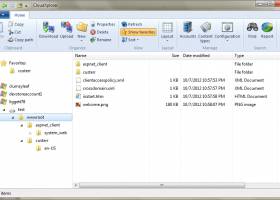
CloudXplorer is a simple tool to assist you explore your Windows Azure storage. It has as simple and intuitive Windows Explorer-like interface and full support of Windows Azure storage service API. It works with the local development storage and supports multiple Windows Azure storage accounts and account custom domains.
By using CloudXplorer you have the possibility to import as many files and you want, store and retrieve blob and container metadata, create shared access signatures, as well as to create, delete, promote or download blob snapshots.
Features
New in v4: support for Office 365 Sharepoint Online.
New in v4: support for Box.
New in v4: support for Oracle Cloud Storage, Rackspace Cloud Files and SoftLayer Object Storage.
New in v4: support for Amazon Cloud Drive.
New in v4: support for Google Drive.
New in v4: support for Azure DataLake store.
New in v4: support for Microsoft OneDrive (Personal and Business).
New in v4: support for BackBlaze B2 storage.
copy/move your data from Amazon S3/Google Storage to Azure Blobs or Azure Files.
Slick UI with a modern Windows-style ribbon.
Fast and optimized multithreaded downloads and uploads.
Native copy/move blobs/files and folders between different Azure Blobs, Azure Files, Google Storage and Amazon S3 accounts.
Search for a specific blob/file/object or folder name/pattern within an account.
Report on the contents of a container/share/bucket.
Import/export the account information.
Organize accounts into logical groups.
Drag-and-drop enables dragging files and folders from ZIP-archives etc.
Favorites can be used as a container for shortcuts to frequently used locations.
Create, expand or shrink VHDs directly in Azure Blobs storage.
Access Azure Blobs/Azure Files accounts anonymously using container- and share-based shared access signature tokens.
Browse ZIP archives, ISO/CAB/VHD (including Ext, FAT and NTFS file systems) files in-place.
Simple and intuitive Windows Explorer-like interface.
Full support of Azure Blobs, Azure Files, Amazon S3 and Google Storage.
Works with the Azure development storage.
Copy and move blobs/files/objects between folders, containers/shares/buckets or even different accounts (Azure Blobs & Azure Files).
Rename and delete blobs/files/objects, create new containers/shares/buckets and folders.
Upload local files/directories and download blobs/files/objects or entire folders.
Auto-resume upload and download of large files.
Set and retrieve extended properties like Content-Encoding, Cache-Control etc.
Store and retrieve blob/file and container/share metadata.
Set container access control and manage container/share access policies.
Create, delete, promote or download blob snapshots (Azure Blobs) or object versions (Amazon S3/Google Storage).
Create shared access signatures for containers and blobs (Azure Blobs), shares and files (Azure Files) or signed URLs (Amazon S3/Google Storage).
Supports drag-and-drop (with Aero effects on Windows Vista/7).
Non-blocking operations with the native progress dialogs.
By using CloudXplorer you have the possibility to import as many files and you want, store and retrieve blob and container metadata, create shared access signatures, as well as to create, delete, promote or download blob snapshots.
Features
New in v4: support for Office 365 Sharepoint Online.
New in v4: support for Box.
New in v4: support for Oracle Cloud Storage, Rackspace Cloud Files and SoftLayer Object Storage.
New in v4: support for Amazon Cloud Drive.
New in v4: support for Google Drive.
New in v4: support for Azure DataLake store.
New in v4: support for Microsoft OneDrive (Personal and Business).
New in v4: support for BackBlaze B2 storage.
copy/move your data from Amazon S3/Google Storage to Azure Blobs or Azure Files.
Slick UI with a modern Windows-style ribbon.
Fast and optimized multithreaded downloads and uploads.
Native copy/move blobs/files and folders between different Azure Blobs, Azure Files, Google Storage and Amazon S3 accounts.
Search for a specific blob/file/object or folder name/pattern within an account.
Report on the contents of a container/share/bucket.
Import/export the account information.
Organize accounts into logical groups.
Drag-and-drop enables dragging files and folders from ZIP-archives etc.
Favorites can be used as a container for shortcuts to frequently used locations.
Create, expand or shrink VHDs directly in Azure Blobs storage.
Access Azure Blobs/Azure Files accounts anonymously using container- and share-based shared access signature tokens.
Browse ZIP archives, ISO/CAB/VHD (including Ext, FAT and NTFS file systems) files in-place.
Simple and intuitive Windows Explorer-like interface.
Full support of Azure Blobs, Azure Files, Amazon S3 and Google Storage.
Works with the Azure development storage.
Copy and move blobs/files/objects between folders, containers/shares/buckets or even different accounts (Azure Blobs & Azure Files).
Rename and delete blobs/files/objects, create new containers/shares/buckets and folders.
Upload local files/directories and download blobs/files/objects or entire folders.
Auto-resume upload and download of large files.
Set and retrieve extended properties like Content-Encoding, Cache-Control etc.
Store and retrieve blob/file and container/share metadata.
Set container access control and manage container/share access policies.
Create, delete, promote or download blob snapshots (Azure Blobs) or object versions (Amazon S3/Google Storage).
Create shared access signatures for containers and blobs (Azure Blobs), shares and files (Azure Files) or signed URLs (Amazon S3/Google Storage).
Supports drag-and-drop (with Aero effects on Windows Vista/7).
Non-blocking operations with the native progress dialogs.
CloudXplorer 4.9.0 download tags
CloudXplorer 4.9.0 Windows 7 release notes
New Release
added support for IBM cloud object storage.
added support for soft deleted blobs. To see deleted blobs, "Show hidden items" needs to be turned on (Azure Blobs).
added resumable uploads for large files (BackBlaze).
[ CloudXplorer release history ]
added support for IBM cloud object storage.
added support for soft deleted blobs. To see deleted blobs, "Show hidden items" needs to be turned on (Azure Blobs).
added resumable uploads for large files (BackBlaze).
[ CloudXplorer release history ]
CloudXplorer 4.9.0 Windows 7 requirements
Microsoft .NET Framework 4.0
Bookmark CloudXplorer
CloudXplorer for Windows 7 - Copyright information
All CloudXplorer reviews, submitted ratings and written comments become the sole property of Windows 7 download. You acknowledge that you, not windows7download, are responsible for the contents of your submission. However, windows7download reserves the right to remove or refuse to post any submission for any reason.
Windows 7 Download periodically updates pricing and software information of CloudXplorer full version from the publisher, but some information may be out-of-date. You should confirm all information.
Using warez version, crack, warez passwords, patches, serial numbers, registration codes, key generator, pirate key, keymaker or keygen for CloudXplorer license key is illegal and prevent future development of CloudXplorer. Download links are directly from our mirrors or publisher's website, CloudXplorer torrent or shared files from free file sharing and free upload services, including Rapidshare, MegaUpload, YouSendIt, SendSpace, DepositFiles, DivShare, HellShare, HotFile, FileServe or MediaFire, are not used.
Windows 7 Download periodically updates pricing and software information of CloudXplorer full version from the publisher, but some information may be out-of-date. You should confirm all information.
Using warez version, crack, warez passwords, patches, serial numbers, registration codes, key generator, pirate key, keymaker or keygen for CloudXplorer license key is illegal and prevent future development of CloudXplorer. Download links are directly from our mirrors or publisher's website, CloudXplorer torrent or shared files from free file sharing and free upload services, including Rapidshare, MegaUpload, YouSendIt, SendSpace, DepositFiles, DivShare, HellShare, HotFile, FileServe or MediaFire, are not used.
Post CloudXplorer review


Windows 7 CloudXplorer related downloads
When you purchase Windows 7 from Microsoft Store, you have the option to download an ISO file or compressed files. The Windows 7 USB/DVD Download tool allows you to create a ...
... recover lost data from FAT partitions on your Windows 7 system? Look no further! Introducing the powerful "Windows ...
... to recover lost or deleted files from your Windows 7 pen drive? Look no further! Introducing Windows Pen ...
CloudDrive is a free client tool to help you ... your files to Adobe Acrobat's 5G free online storage. With it, you can upload/download any files or ...
... data recovery software by www.undelete.co.in. Designed exclusively for Windows 7, this exceptional tool effortlessly recovers your deleted files, ...
My Account
Help
Windows 7 Software Coupons
-
MacX Video Converter Pro
56% Off -
MacX DVD Ripper Pro
50% Off -
Media Player Morpher
85% Off -
WinX DVD Ripper
50% Off -
FREE VPN PROXY by SEED4.ME WINDOWS
Free VPN by Seed4Me
My Saved Stuff
You have not saved any software.
Click "Save" next to each software.
Click "Save" next to each software.
Would you like to receive announcements of new versions of your software by email or by RSS reader? Register for FREE!
Windows 7 Downloads Picks
- iTop Data Recovery 6.1.0.936
- GoodSync2Go 12.9.29.9
- R-Studio for Windows x64 9.4 B191310
- StrongRecovery Portable 5.2.2.2
- DMDE 4.0.6.806
- BackUp Maker Standard Edition 8.405
- StrongRecovery 5.2.2.2
- KLS Backup Standard 2025 (14.0.0.2)
- Driver Genius Professional Edition 25.0.0.136
- R-Studio 9.5 build 191742
- Backup for Workgroups 4.3
- Backup To EMail 2.2 Build 252
- Mozy Remote Backup 2.36.5.646
- Virtos S.O.S Backup Enterprise 5.5.05
- Windows 7 USB/DVD Download Tool 1.0.24.0
- FreeFileSync 14.9
- Sync Breeze Ultimate 18.0.24
- Image 4.01
- A Bootable USB 0.9.6.508 beta
- Portable Recover Files 3.3.1.0
Popular Tags
windows
disk
memory
backup
picture
restore
folder
card
pictures
damaged
recover
utility
partition
salvage
images
rescue
video
corrupted
deleted
usb
audio
digital
erased
recovery
drive
undelete
retrieve
media
file
formatted
Popular Windows 7 Software
- Network Monitor II 31.7
- Avro Keyboard 5.6.0.0
- Media Creation Tool x64 22H2
- Ghostscript (x64 bit) 10.03.1
- Windows 7
- iTop Data Recovery 6.1.0.936
- Windows 7 Service Pack 1 7601.17514.1011
- iTop Easy Desktop 4.2.0.312
- Advanced SystemCare 19.3.0.200
- Smart Game Booster 5.3.1.692
- iTop PDF 3.6.0.4
- GoodSync2Go 12.9.29.9
- The Dude 7.22.2 Stable
- IObit Uninstaller 15.4.0.1
- Atlantis Word Processor 5.0.4
© 2026 Windows7Download.com - All logos, trademarks, art and other creative works are and remain copyright and property of their respective owners. Microsoft Windows is a registered trademarks of Microsoft Corporation. Microsoft Corporation in no way endorses or is affiliated with windows7download.com.