


1-abc.net Right Click Configurator for Windows 7 - "Streamline Context Menus with 1-abc.net Right Click Configurator" - Windows 7 Download


1-abc.net Right Click Configurator 7.00
"Revamp your right-click menu with ease - streamline your workflow!"
Looking for a quick and easy way to customize your Windows 7 desktop? Look no further than 1-abc.net Right Click Configurator! Developed by 1-abc.net, this software offers you a wide range of options for customizing your right-click context menu, allowing you to streamline your workflow and boost productivity. With an intuitive interface and convenient features, this software is a must-have for anyone looking to fully optimize their Windows 7 experience. Download now and see the difference for yourself!
1-abc.net Right Click Configurator 7.00 full details

| File Size: | 399 kB |
|---|---|
| License: | Trialware |
| Price: | $14.99 |
| Released: | 2015-10-01 |
| Downloads: | Total: 542 | This Month: 0 |
| Publisher: | 1-abc.net |
| Publisher URL: | https://1-abc.net/ |

Download 1-abc.net Right Click Configurator 7.00
Save 1-abc.net Right Click Configurator to My Stuff
Tweet
1-abc.net Right Click Configurator - Windows 7 Download awards


1-abc.net Right Click Configurator 7.00 full description
Decide what the Windows Explorer popup menu does!
When you use Windows Explorer for opening, deleting, moving or copying files (e.g. by executing it through the “My Computer” icon on your desktop) a popup menu is opened by clicking the right mouse button on any entry that allows you to get access to many different programs and features.
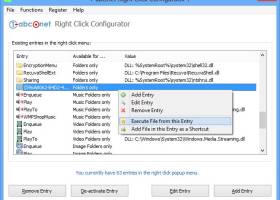
1-abc.net Right Click Configurator has a very clean user interface that is pretty easy to understand. All of your context menu options are listed in a large window and are grouped together by availability. For example, certain entries, such as file encryption, are only available by right-clicking on a file, while others are only available by right-clicking on a folder. Thanks to the straightforward commands buttons, removing and deactivating entries required only a single mouse click. Adding and editing new entries required a little more work and a visit to the Help menu. To add and edit an entry, we had to specify the type of entry, the name, and the command line. However, we were a little confused by the parameters option. The Help menu didn't really offer any kind of explanation, other than that you needed to make sure the added program could work with the parameters. But it was also in the Help menu that we came across a little tidbit of info regarding Vista users and deactivating the UAC to ensure that the program works correctly. We didn't deactivate our UAC, and we didn't have any issues.
Features:
* Very easy-to-use interface
* Configure the right click behaviour for files, drives, music files, image files, video files or even files of any type
* Add customized entries of any kind to the right click menu
* Activate already existing features on your Windows system like copying or moving a file or folder to another place
* Add hidden Windows default features like the Character Map, Windows Cleaning Manager or the Registry Editor to your popup menu
* Configure the 'Send To' sub menu in your right click menu
* Add parameters to your right click entries
* Print out your current right click menu settings on your local printer or via network
* Right click configuration report - to see what changes you made with this program
* Check right click entries for errors
* Program can be installed on USB sticks, floppy disks or nearly all other re-writable media
* Very low system resources required
When you use Windows Explorer for opening, deleting, moving or copying files (e.g. by executing it through the “My Computer” icon on your desktop) a popup menu is opened by clicking the right mouse button on any entry that allows you to get access to many different programs and features.
1-abc.net Right Click Configurator has a very clean user interface that is pretty easy to understand. All of your context menu options are listed in a large window and are grouped together by availability. For example, certain entries, such as file encryption, are only available by right-clicking on a file, while others are only available by right-clicking on a folder. Thanks to the straightforward commands buttons, removing and deactivating entries required only a single mouse click. Adding and editing new entries required a little more work and a visit to the Help menu. To add and edit an entry, we had to specify the type of entry, the name, and the command line. However, we were a little confused by the parameters option. The Help menu didn't really offer any kind of explanation, other than that you needed to make sure the added program could work with the parameters. But it was also in the Help menu that we came across a little tidbit of info regarding Vista users and deactivating the UAC to ensure that the program works correctly. We didn't deactivate our UAC, and we didn't have any issues.
Features:
* Very easy-to-use interface
* Configure the right click behaviour for files, drives, music files, image files, video files or even files of any type
* Add customized entries of any kind to the right click menu
* Activate already existing features on your Windows system like copying or moving a file or folder to another place
* Add hidden Windows default features like the Character Map, Windows Cleaning Manager or the Registry Editor to your popup menu
* Configure the 'Send To' sub menu in your right click menu
* Add parameters to your right click entries
* Print out your current right click menu settings on your local printer or via network
* Right click configuration report - to see what changes you made with this program
* Check right click entries for errors
* Program can be installed on USB sticks, floppy disks or nearly all other re-writable media
* Very low system resources required
1-abc.net Right Click Configurator 7.00 download tags
1-abc.net Right Click Configurator 7.00 Windows 7 release notes
New Release
Full screen view for better overview, editable exceptions list to avoid any unwanted right click entry changes, optimized interface and much more.
[ 1-abc.net Right Click Configurator release history ]
Full screen view for better overview, editable exceptions list to avoid any unwanted right click entry changes, optimized interface and much more.
[ 1-abc.net Right Click Configurator release history ]
Bookmark 1-abc.net Right Click Configurator
1-abc.net Right Click Configurator for Windows 7 - Copyright information
All 1-abc.net Right Click Configurator reviews, submitted ratings and written comments become the sole property of Windows 7 download. You acknowledge that you, not windows7download, are responsible for the contents of your submission. However, windows7download reserves the right to remove or refuse to post any submission for any reason.
Windows 7 Download periodically updates pricing and software information of 1-abc.net Right Click Configurator full version from the publisher, but some information may be out-of-date. You should confirm all information.
Using warez version, crack, warez passwords, patches, serial numbers, registration codes, key generator, pirate key, keymaker or keygen for 1-abc.net Right Click Configurator license key is illegal and prevent future development of 1-abc.net Right Click Configurator. Download links are directly from our mirrors or publisher's website, 1-abc.net Right Click Configurator torrent or shared files from free file sharing and free upload services, including Rapidshare, MegaUpload, YouSendIt, SendSpace, DepositFiles, DivShare, HellShare, HotFile, FileServe or MediaFire, are not used.
Windows 7 Download periodically updates pricing and software information of 1-abc.net Right Click Configurator full version from the publisher, but some information may be out-of-date. You should confirm all information.
Using warez version, crack, warez passwords, patches, serial numbers, registration codes, key generator, pirate key, keymaker or keygen for 1-abc.net Right Click Configurator license key is illegal and prevent future development of 1-abc.net Right Click Configurator. Download links are directly from our mirrors or publisher's website, 1-abc.net Right Click Configurator torrent or shared files from free file sharing and free upload services, including Rapidshare, MegaUpload, YouSendIt, SendSpace, DepositFiles, DivShare, HellShare, HotFile, FileServe or MediaFire, are not used.
Post 1-abc.net Right Click Configurator review


Windows 7 1-abc.net Right Click Configurator related downloads
A powerful software tool to tweak, optimize, maintain and tune up your Windows 7, it includes over thirty different utilities! It will ...
The Windows 7 and Windows Server 2008 R2 Service Pack 1 ... package includes all previously publicly released updates for Windows 7 and Windows Server 2008 R2. It is standard ...
... accessing such programs. It has been tested on Windows 7 & Windows Vista – but works on Windows ...
Windows Logon Notfier is a handy software designed to enable you to create logon messages ... and “Write Message Here’ spaces provided for and click “Add Message”. ...
Windows 7 Manager is an all-in-one system cleaner, tweaker, and ... them difficult for ordinary users to access. Windows 7 Manager Features: Information Optimizer Cleaner Customization Security ...
My Account
Help
Windows 7 Software Coupons
-
IObit Uninstaller
35% Off -
IObit Malware Fighter
35% Off -
Advanced SystemCare
35% Off -
IObit Software Updater
35% Off -
WinX DVD Ripper
50% Off
My Saved Stuff
You have not saved any software.
Click "Save" next to each software.
Click "Save" next to each software.
Would you like to receive announcements of new versions of your software by email or by RSS reader? Register for FREE!
Windows 7 Downloads Picks
- Windows 7 Service Pack 1 7601.17514.1011
- Advanced Serial Data Logger Enterprise 4.7.7 B417
- Autoruns for Windows 14.11
- Glary Utilities 6.8
- Advanced Serial Data Logger Professional 4.7.7 B417
- Windows 7 Manager 5.2.0
- Advanced Serial Data Logger Lite 4.7.7 B417
- Windows 7 Manager (x64bit) 5.2.0
- Advanced Serial Data Logger Standard 4.7.7 B417
- Cygwin 64-bit 3.5.3
- Mz Ram Booster 4.1.0
- Smart Game Booster 5.2.3.623
- Advanced SystemCare 17.3.0.204
- Microsoft Fix it Center beta
- CCleaner Portable 6.23.11010
- Windows 7 Upgrade Advisor 2.0.5000.0
- Driver Genius Professional Edition 24.0.0.123
- Cygwin 3.5.3
- Revo Uninstaller Pro 5.2.6
- Windows Access Panel 1.0
Popular Tags
memory
disk
speed
uninstall
disk cleaner
repair
spyware
cleaner
tweak
security
registry
remove
utility
tune
windows
faster
boost
driver
clean
optimize
defrag
ram
system
optimizer
cpu
performance
startup
vista
backup
registry cleaner
Popular Windows 7 Software
- BlueStacks App Player 4.280.1.1002
- Windows 7 Service Pack 1 7601.17514.1011
- Windows 7
- CPU Cooling Master - Laptop Cooler 1.6.8.8
- SuperCopier x64 2.2.6.6
- Games for Windows - Live 3.5.50.0
- Advanced Driver Updater 4.6.1086.5319
- BIOS Agent Plus 2.2019.1.31
- System Optimizer and Cleaner Software 7.0
- Directory Monitor Portable 2.16.0.4
- SIW 2024.14.1.0417
- Avro Keyboard 5.6.0.0
- UEFI BIOS Updater 1.79.17
- R-Studio for Windows x64 9.4 B191303
- Directory Monitor 2.16.0.4
© 2024 Windows7Download.com - All logos, trademarks, art and other creative works are and remain copyright and property of their respective owners. Microsoft Windows is a registered trademarks of Microsoft Corporation. Microsoft Corporation in no way endorses or is affiliated with windows7download.com.